Everyday messaging • Works even without internet

Fast online.
Unstoppable mesh.

Talk live like on a walkie-talkie, share offline maps, and create groups with friends and family. Fast online, and when you're at a festival, traveling, or off the grid, keep communicating directly phone-to-phone.

⚡ Instant messaging 🎙️ Live Walkie-Talkie 🗺️ Offline Maps 🚫 No phone number needed 📶 Works without cell signal
Tip We recommend installing before traveling: once off the grid you won't be able to download it. Uses minimal storage and battery.
🗺️ MAPS THAT WORK WITHOUT INTERNET

Full maps without cell service.
Find your friends even with zero coverage.

Lost cell signal on a road trip or in the outdoors? Chax stores maps directly on your phone so you can always navigate. View satellite or street views, see the exact distance to your friends, and follow trails with zero mobile data spent.
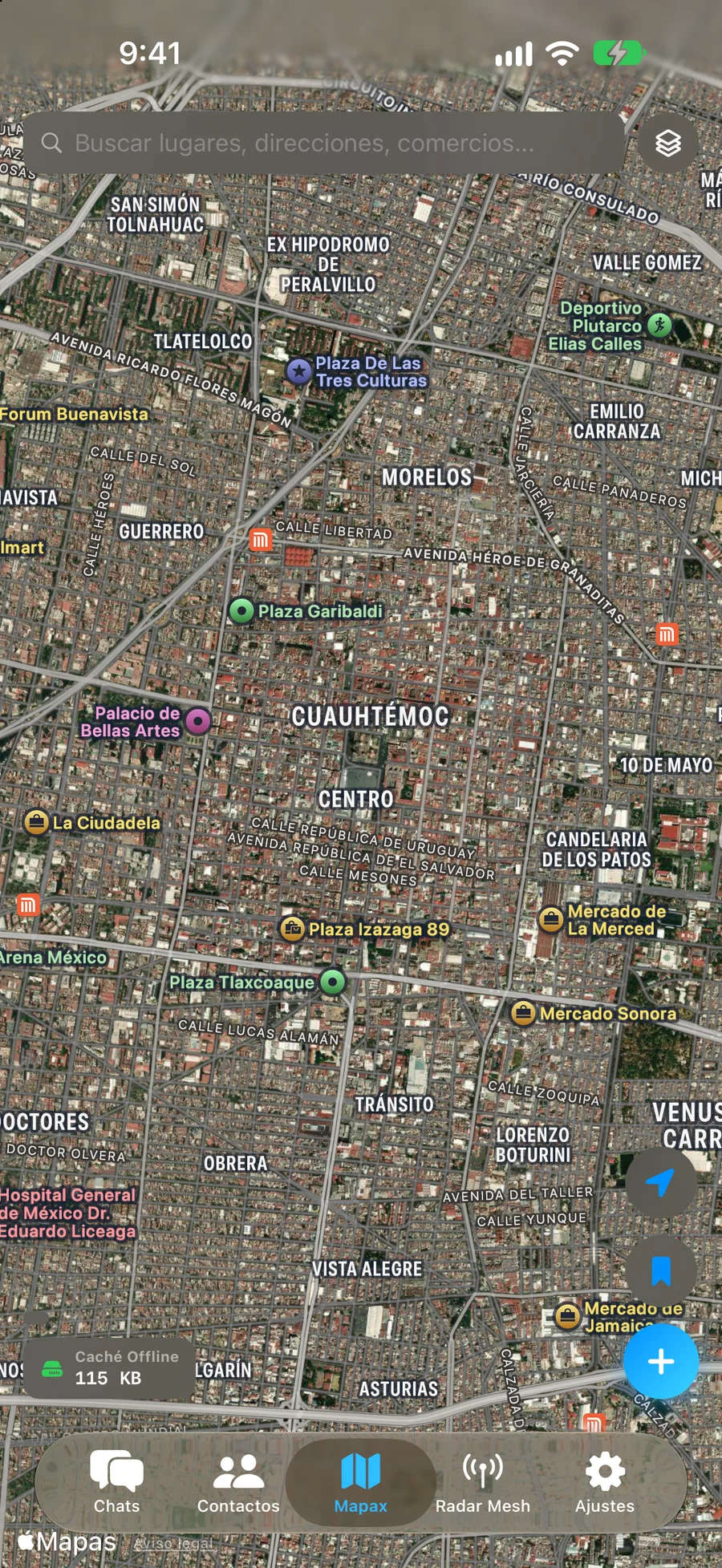
🗺️ Ready-to-use offline maps 🛰️ Satellite and street views 🧭 Compass & distance to friends 📍 Trail path walked 💾 Takes minimal phone storage 📶 Zero mobile data usage
Maps on your iPhone
100% OFFLINE
Mapax: Offline Maps and Satellite on iPhone
Nearby friend
Javier (42 meters away)
📍
Where to walk
A few steps forward
🧭
Trail walked
Stored on your own phone
🚶
Shared maps
Ready to view offline
🗺️
Phone storage
Automatically cleans old unused tiles
🧹
🎙️ LIVE WALKIE-TALKIE

Talk just like on a walkie-talkie.
They hear you instantly, as you speak.

Forget recording long audio clips and waiting for them to send. Press and hold the button and the other person hears your live voice second by second. In loud places or when you can't listen, Chax transcribes incoming voice to on-screen text instantly.
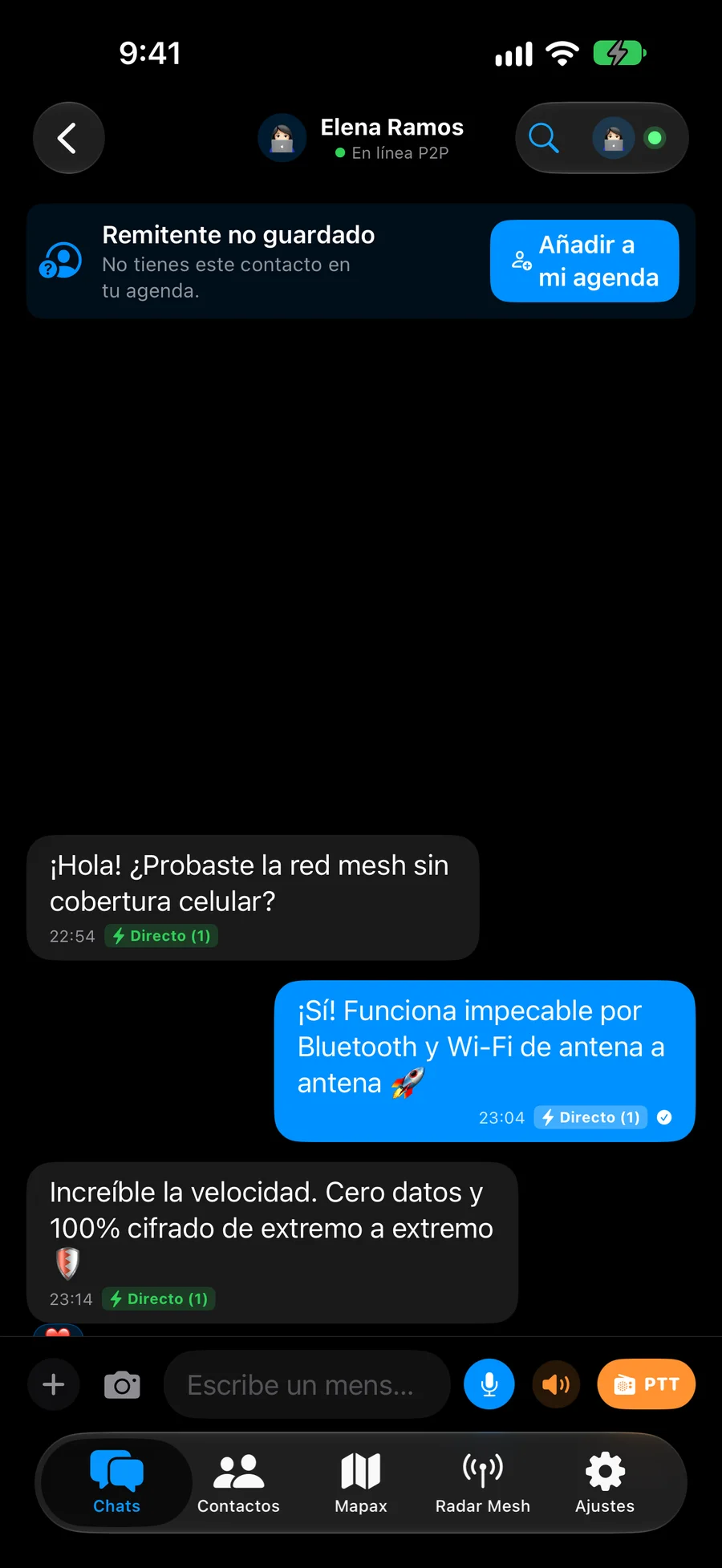
📻 Press, hold, and talk ⚡ Heard instantly with zero wait 🗣️ Live speech-to-text on screen 🚗 Hands-free listening mode 🔒 Your voice travels encrypted & private
Live Walkie-Talkie
LIVE AUDIO
Chat Cifrado con Botón PTT Walkie-Talkie en iPhone
Tap to Test Sound
Radio sound and haptic vibration in your hand
00:06
How does it sound?
Live, word for word
📻
Can't listen right now?
Transcribes to text on your screen
🗣️
Voice privacy
Only you and your contact can hear it
🔒
✨ CREATE STICKERS INSTANTLY

Tap any photo to make a sticker.
Cuts out automatically and sends with zero internet.

Create custom stickers in a second: just press and hold a person or object in any photo from your gallery and your iPhone cuts it out automatically. Send it right away to friends, even with zero cellular signal in the middle of nature.

✂️ Automatic 1-tap cutout 🎨 Instant transparent background 🏔️ Sends phone-to-phone 🔒 Your photos never leave your device 🎬 Search fun GIFs with zero ads
Create stickers with one tap
1-TAP CUTOUT
1. Press & hold the photo
🧗‍♂️
Your phone detects and cuts out the subject automatically
2. Send to your friend
🧗‍♂️
Sticker Ready
✓✓ Sends directly without internet
Arrives in under a second using zero data
🔐 TOTAL PRIVACY

No phone number required.
No emails and no passwords.

Most apps demand your phone number or email to register and track who you are. Chax requires none of that. Your account is created inside your own device: nobody can cancel it, nobody knows who you talk to, and nobody can harvest or sell your data.
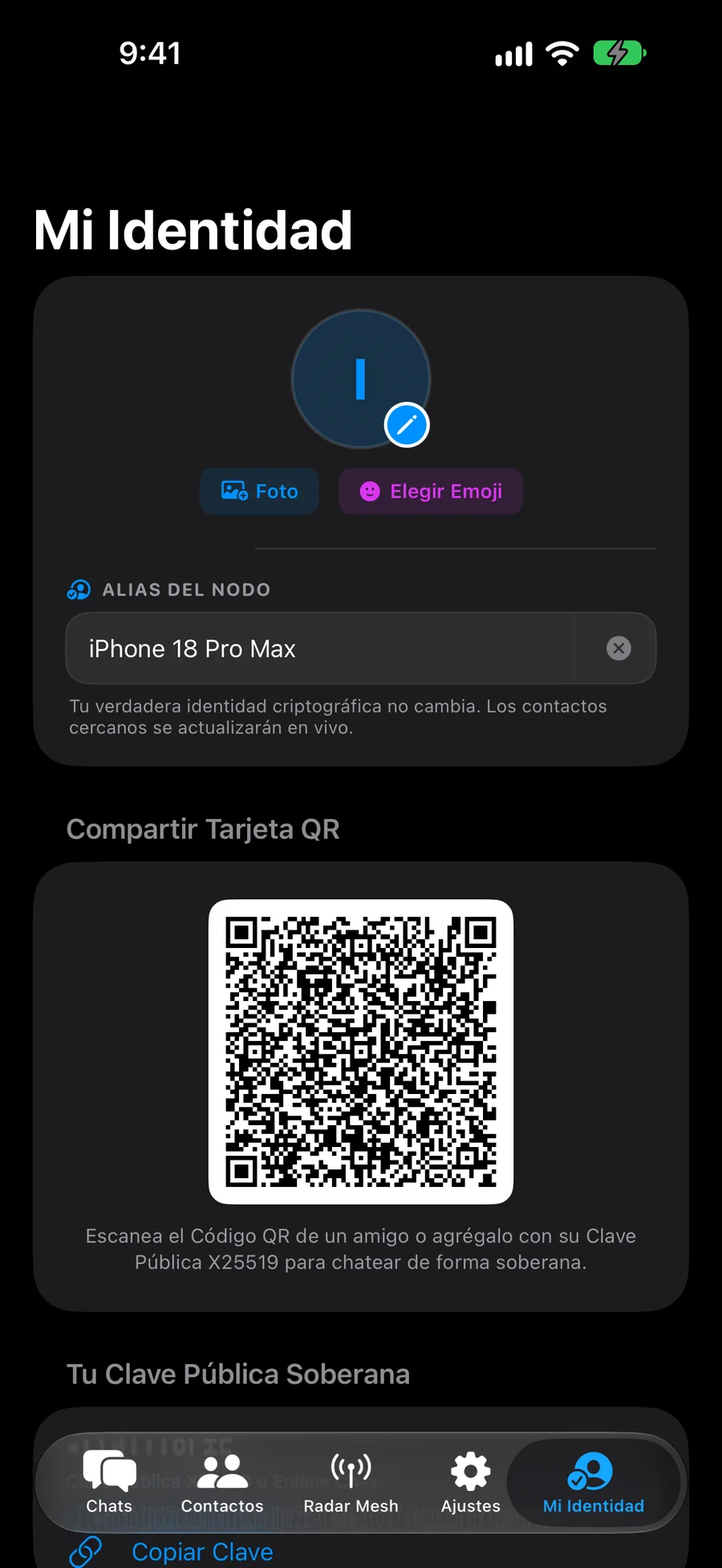
🚫 No phone number asked 🚫 No emails or passwords 📲 Add friends with QR code 🛡️ Nobody can freeze your account 🔒 100% Private conversations
Your account belongs only to you
100% PRIVATE
Identidad Soberana Chax en Secure Enclave
🔐
Security inside your own device
Your data is never uploaded to corporate servers
Your profile: Unique, private, and under your full control
Protection: Only you and the recipient can read messages
No passwords: Your phone recognizes you securely & automatically
Peace of mind: Nobody can suspend or take down your account
Requires phone number?
Never, 0% required
📵
Companies watching your chats?
None, direct communication
🚫
How to add a friend?
Show your QR code and ready
📲
👥 GROUPS & MAC DESKTOP

Organized groups and 24-hour stories.
On your iPhone and on your Mac.

Create groups for your family, community, or team with full flexibility: where everyone chats freely, or announcement-only channels. Share 24-hour disappearing photo stories, reply privately inside any group, and use Chax comfortably on your Mac desktop.
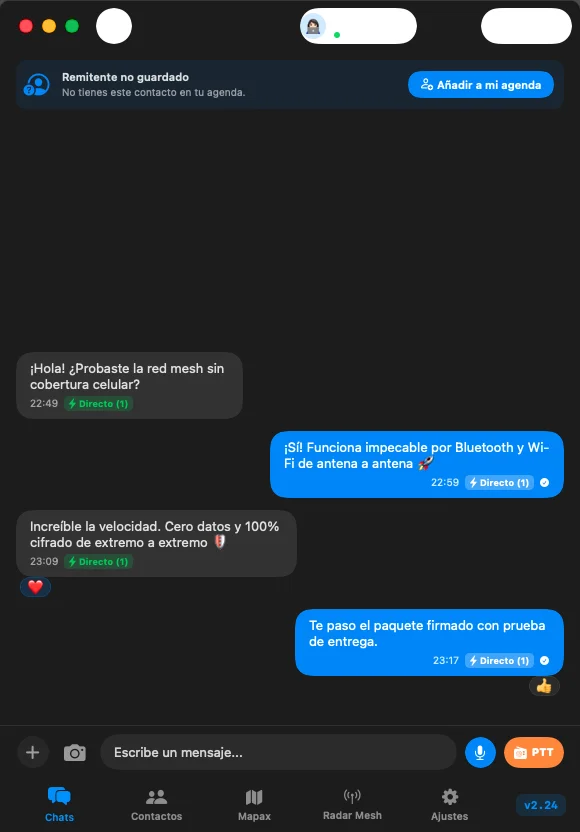
👥 Open chat or announcement groups ⏳ Stories that last 24 hours 💻 Native app ready for your Mac 💬 Reply privately inside a group 📂 Share photos and files in one click
Chax on your Mac and iPhone
iPHONE + MAC
Chax Desktop • macOS
Chax en macOS Desktop Relay y Canales
🛡️ 3 ways to organize your groups
Choose whether everyone chats freely, if messages are moderated, or if it acts as a broadcast channel.
⏳ 24-Hour Stories
Share daily photo moments with your friends that disappear automatically the next day, seeing who viewed them.
🖥️ Chax on your Mac Computer
Type with full keyboard, drag & drop photos or files, and keep all your conversations up to date from your desktop.
🔒 Reply privately to a message
If someone asks something in the group, reply directly to them without cluttering the main conversation.
⚡ 100% AUTOMATIC • NO COMPLICATIONS

Just write and hit send.
Chax finds the best route so your message always arrives.

No setup or technical knowledge needed. If you have WiFi or mobile data, your message travels over the internet. If you are near the recipient, it flies directly through the air. And if cell towers go down in the area, it hops phone-to-phone until delivered.
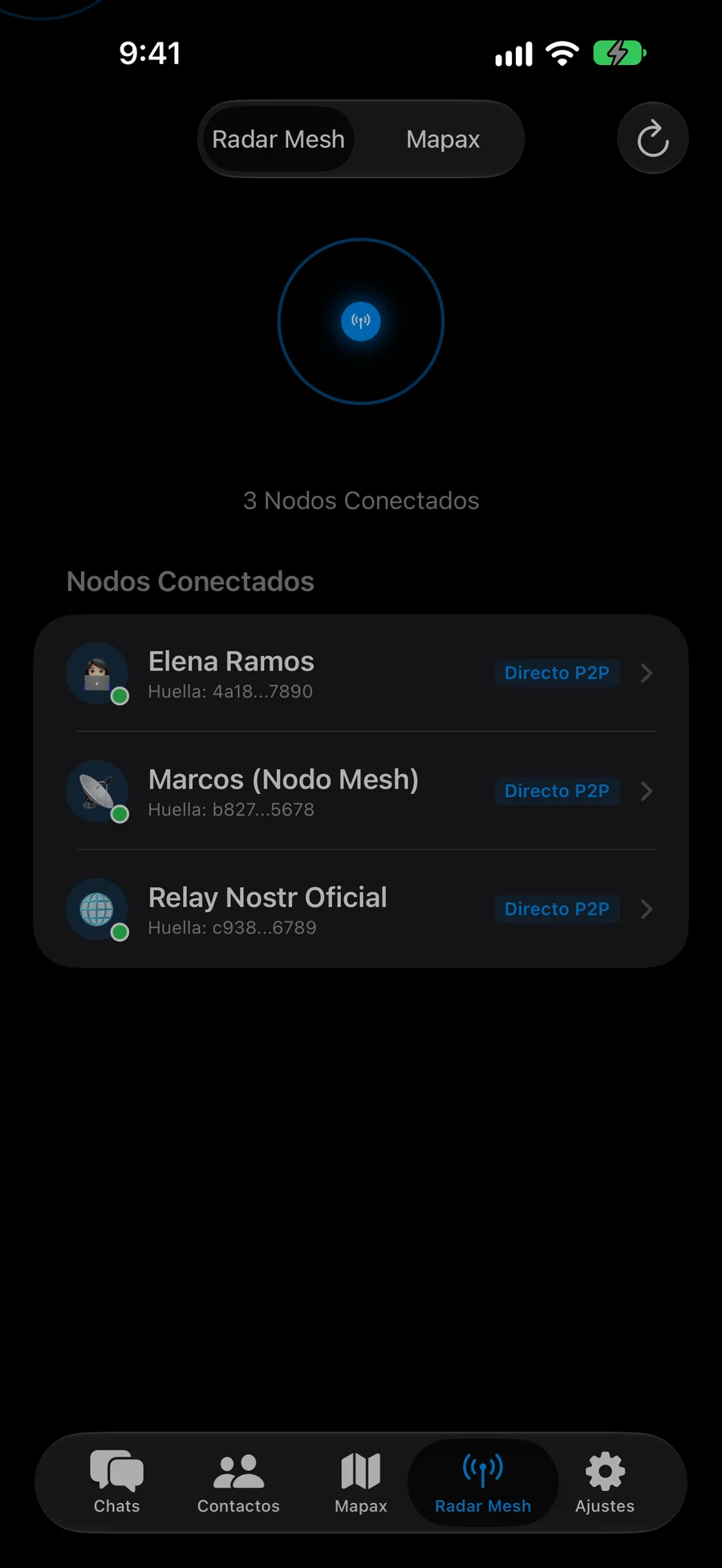
✨ Everything works completely automatically 🌐 Uses internet when connected 📡 Talks direct phone-to-phone when nearby 🔄 Hops between phones if towers collapse 🔋 Extremely low battery impact
How does your message reach its destination?
100% AUTOMÁTICO
Radar de personas cercanas en iPhone
🌐 1. Over the Internet (if connected)
Instant
With normal WiFi or mobile data, your message delivers instantly anywhere across the globe.
📡 2. Through the air (if nearby)
No internet • 0 data
If you are within 100 meters of your contact, the message travels directly between phones with 0 data used.
⚡ 3. Hopping between phones (if no network)
Works in blackouts
During blackouts or packed festivals, the message hops safely between nearby phones until delivered.
How It Works

How does a message travel with zero signal?

See step-by-step how your message reaches its destination: hopping between phones, connecting via a nearby friend with signal, or aiding in emergencies.

PHONE-TO-PHONE

From 1 phone to 2, 2 to 4... until reaching your friend

Your message travels in a digital safe box that only your friend can open. No phone along the way can see what you wrote or know who you are.

1. You send the message

Your phone broadcasts it through the air to phones around you.

2. First hop

Two nearby phones receive the sealed packet and forward it ahead.

3. Spreads through crowd

Those phones forward it to four more, covering greater distance.

4. Reaches your friend

Your friend's phone recognizes the message, decrypts it, and confirms delivery ✓✓.

📱 1. You send Through the air 📱 Phone A (Step 1) 📱 Phone B (Step 1) 📱 Step 2 📱 Step 2 📱 Step 2 📱 Step 2 🎯 Your Friend ✓✓ Received 🔒 100% Protected • Nobody in the middle can read it
SHARED CONNECTION

If anyone nearby has internet, your message exits to the world

If you need to reach someone in another city while you're in a subway or concert with no data, just one person nearby with signal is enough to route your message securely to the internet.

1. You are off-grid

Your message travels through the air looking for someone nearby.

2. Someone nearby has signal

Their phone receives the sealed message and uploads it without being able to read it.

3. Reaches your contact

In milliseconds your friend receives the message in any country.

NO SIGNAL ZONE 🚫 Tunnel / Basement / Festival 📱 You (No signal) 📱 Through the air 📶 Friend with signal Internet Bridge INTERNET Open Network 🌍 Remote Contact Tokyo / London (120ms)
EMERGENCY ASSISTANCE

Communicate during blackouts, quakes, or storms

When an earthquake or storm knocks down city towers, neighbors' phones automatically link together to create an immediate local safety net without wires or phone carriers.

1. Power & cell network down

Cell towers fail and internet collapses across the entire area.

2. Phones find each other

Chax connects nearby neighbors' phones automatically over the air.

3. Confirm safety or call aid

Share your location or send "We are safe" status updates without cell signal.

TOWER DOWN ⚡ 🚨 SOS Beacon (Family) 🏠 Neighbor Relay 💻 Mac in Shelter 🚑 Rescue Brigade Mapax GPS Located ⚡ Community Network Active • 0% Power Grid Dependent
SHARED MAPS

Share maps with friends offline

If you saved the map before leaving, your phone can beam it to your friends through the air with zero internet used. You can also view trails walked to reunite easily on the trail.

1. Stored on your device

Maps are stored efficiently and automatically purge old unused tiles.

2. Beamed phone-to-phone

If your companion is missing map coverage, your phone beams it over the air in seconds.

3. See friends' trails

See your friends' recent trail paths on the map so nobody gets separated.

3h ago 1h ago 15m ago 📱 Your Phone (With Map) Saved Maps 🧭 Your Friend (No Internet) ✓ Map Received Over the Air 🗺️ MAPS SHARED DIRECTLY PHONE-TO-PHONE
Real-Life Scenarios

Where does Chax save you? Real-life situations

Moments where standard messaging apps fail because cellular infrastructure collapses.

Scenario 01 • Festivals & Concerts

60,000 people at a festival. 5G network collapsed. You can't find your group.

The Common Problem

You went for drinks. Coming back, the crowd is endless. Your phone shows "No Service" or full bars with WhatsApp showing a perpetual clock ⏱️. You are completely disconnected.

The Chax Solution: Your message doesn't seek a congested distant tower. It hops in milliseconds phone-to-phone among people around you using secure Bluetooth.

  • The bigger the crowd, the faster messages travel: Every phone with Chax helps relay messages invisibly.
  • Ironclad privacy: Phones along the way only relay sealed envelopes; they cannot read your chats.
  • Meeting point: Share coordinates and locate your group with nearby radar without data.
⚠️ RED 5G SATURADA • 0 BPS (TORRE COLAPSADA) L Leo (iPhone 15 Pro) Active nearby network ¿Dónde están? 📍 Torre 4 escenario Through the air • 12:42 📶 No Cellular • Connected Phone 1 Phone 2 Phone 3 S Sofía (iPhone 15 Pro) Connected nearby ¿Dónde están? 📍 ¡Frente a Torre 4! 🎉 ✓✓ Entregado en 0.4s ⚡ Message delivered ⚡ Delivered in 0.4s hopping across 3 phones
Scenario 02 • Mountain, Trekking & Adventure

In a remote canyon, mountain peak, or jungle. Zero cell signal. Every meter counts.

The Common Problem

Out hiking or cycling with friends, an unmarked fork or sudden fog separates your group. Zero cell towers for dozens of kilometers. How do you know which way to walk or if someone got injured?

The Chax Solution: Open your offline map. Chax detects your friends' phones through the air, shows exact distance, where to walk, and lets you speak via live Walkie-Talkie with zero data and zero expensive gear.

  • Offline maps: Full street and satellite maps stored right on your own phone.
  • Compass & distance: Real-time directional heading and distance in meters to your group.
  • Instant Walkie-Talkie: Speak live simply by pressing and holding the button.
🗺️ Offline Mapax N E S W 🧭 Heading: Northwest 📏 Distance: 48m ⛰️ Altitude: 2,450m GPS without Internet 50m 25m Matthew (You) Elena (48m) 🎙️ Walkie-Talkie PTT Live Voice "See you by the river!" Protected Audio • 0.3s ✓✓ Received Direct LIVE • 0.3s 🏔️ MAPAX • COMPASS & WALKIE-TALKIE WITHOUT INTERNET
Scenario 03 • Privacy & Zero Centralization

Your conversations belong to you. Not to corporate servers or advertising monopolies.

The Common Problem

Standard apps require your private phone number, upload your entire contact book to their servers, and inspect your metadata. When their servers crash globally, half the planet goes silent.

The Chax Solution: Your account lives solely on your own phone. Nobody can freeze your account, nobody can take it down, and nobody along the way can see what you write.

  • Zero phone numbers: Connect by showing a QR code or sharing a secure contact link.
  • No central database: There is no corporate server storing your photos, messages, or contacts.
  • Total end-to-end privacy: Only your friend's phone can open your message; for everyone else it is completely unreadable.
🔴 500 SERVER DOWN • CENTRAL CORPORATE SERVERS DOWN ✕ Cloud Inaccessible 📱 Your Phone 📄 Protected Message 🔒 Lock activated 🛡️ Only your friend reads this ✨ No copies on the internet 🔑 Secure on your phone PHONE-TO-PHONE NOBODY CAN SNOOP 📱 Your Friend's Phone ✓✓ Received Direct No Intermediaries ✓ Opens only on their screen 🔐 Completely secure Zero Servers in Middle 🛡️ DIRECT COMMUNICATION • NEVER FAILS
Scenario 04 • Natural Emergencies, Earthquakes & Hurricanes

Major earthquake or hurricane. Total power blackout and cell towers offline.

The Common Problem

After a severe earthquake or hurricane, utility poles fall, electrical substations fail, and cell tower backup batteries drain in minutes. Thousands are left disconnected, not knowing if their families are safe, while emergency dispatch is overwhelmed.

The Chax Solution: Your phone becomes an autonomous survival beacon and relay. Over Low Energy Bluetooth, your message with GPS coordinates in Mapax hops home-to-home and shelter-to-shelter until reaching your loved ones or rescue teams.

  • Community SOS Beacon: Broadcast status reports ("Safe", "Need medical aid") hopping across the city without internet.
  • Neighborhood network without towers: If 10 neighbors have Chax, the entire neighborhood can communicate.
  • Offline maps: Full maps stored on your device to find hospitals, pharmacies, and aid points without cell network.
⚠️ CELLULAR NETWORK AND POWER GRID DOWN 🚨 Urgent SOS Beacon "Family is safe!" Shelter and Food OK GPS: 19.4326°N, 99.1332°W Battery: 88% • Low power mode 🏠 Neighbor A 📻 Neighbor B 🚑 Rescue Brigade Alert Received ✓✓ 📏 Location: 180 meters 🧭 Mapax Bearing: 142° SE ✓ Responders En Route 🚨 NEIGHBORHOOD NETWORK • RESCUE WITHOUT INTERNET
Simple & Secure

The 3 paths of your message

Chax automatically chooses the fastest path to deliver your message without you having to configure anything:

🌐

1. Over the Internet (when connected)

When you have WiFi or mobile data, your messages deliver instantly globally without relying on a central server.

📡

2. Phone-to-phone (when nearby)

If the recipient is within 100 meters, the message travels directly between phones through the air with zero data used.

⚡

3. Hopping between phones (when offline)

If cell service drops in your entire area, the message hops safely and invisibly between nearby phones until delivered.

Community & Resilience

Better to install it beforehand.
Without signal you can no longer download it.

Chax is extremely lightweight: it rests in deep sleep and takes up minimal space. As part of the network, you lend a few imperceptible bytes to help others' messages deliver, but in return we all gain a community network that never shuts down. When we all contribute that small grain of sand, nobody is left disconnected.

🔋

Almost Zero Battery

Low Energy Bluetooth rests in deep sleep. Helping relay a message uses less energy than turning on your screen for a single second.

🤝

A Few Bytes for the Common Good

You lend an invisible thread of data so someone's message arrives. Everyone on the network does the exact same for you.

📲

Download Today & Forget About It

At a crowded concert, in the mountains, or during a blackout, you won't be able to download it. Install it now and have it ready when you need it.

Download Free on TestFlight →
100% Automatic Delivery

You don't have to worry about anything.
If online it uses internet; if nearby, directly phone-to-phone.

Chax resolves the path 100% automatically and invisibly. If your friend is nearby, messages travel directly phone-to-phone without data or servers. If they are far away, it flies over the Internet. And if signal drops, it hops between nearby phones. You just send; Chax handles the rest.

Capability CHAX WhatsApp Telegram Signal
Works without an internet connection? ✓ YES (Phone-to-phone) ✕ No (Fails) ✕ No (Fails) ✕ No (Fails)
Requires phone number? ✓ NEVER (Your account belongs only to you) ✕ Mandatory ✕ Mandatory ✕ Mandatory
Full maps without internet ✓ Built-in (Street & Satellite) ✕ Doesn't exist ✕ Doesn't exist ✕ Doesn't exist
Live voice Walkie-Talkie ✓ Phone-to-phone without network ✕ Requires cloud ✕ Requires cloud ✕ Requires cloud
Resistant to Global Outages ✓ Immune (Decentralized) ✕ Single central server ✕ Single central server ✕ Central server
Antiforensic Flash Autopurge ✓ 1h, 24h, 7d zero forensics ✕ Cloud residuals ✕ Server-side storage ✕ Local DB traces
Offline Tactical Video ✓ BLE/Mesh compressed presets ✕ Requires internet ✕ Requires internet ✕ Requires internet
Optimized P2P Stickers ✓ Ultra-light ~25KB BLE ✕ Requires data ✕ Requires data ✕ Requires data
Cognitive Multi-Radio & LoRa ✓ BLE + LAN + LoRa 915MHz ✕ Incompatible ✕ Incompatible ✕ Incompatible
Sovereign Device Twins ✓ E2EE multi-device without SIM/cloud ✕ Depends on central server ✕ Cloud-stored chats ✕ Requires phone number
Full Apple Ecosystem

The same seamless experience on iPhone, iPad, and Mac

Designed with native Swift technology to get the most out of your Apple devices' hardware and Bluetooth antennas.

Instant Installation

Download Chax on your Devices

Available on TestFlight for iPhone, iPad, and Mac.

🤖

Android (Universal APK)

Direct install without app stores. Android 7+ compatible. Ultrafast Rust native core and Bluetooth Mesh with zero cell signal.

Download APK (v1.083) →
📱

iPhone and iPad

Built for your iPhone, iPad and Mac (v3.253). Live Walkie-Talkie, offline maps, cryptographic autopurge, and direct phone-to-phone messaging.

Install on TestFlight (v3.253) →
💻

Mac, Windows & Linux

Native and fluid desktop apps. Chat with a full physical keyboard and keep all your groups updated from your workstation.

View PC Installers →
📦 Open Official Download Center (Direct Button, QR Code & 2-Step Guide) →
💡
Recommendation: Install Chax before traveling, entering festivals, or heading to remote areas. If you lose cell service, you won't be able to open the app store to download it.
FAQ

Frequently Asked Questions

Everything you need to know about Chax features.

Do I need to buy antennas or extra hardware?

No. Chax works directly with the built-in Bluetooth and Wi-Fi antennas already inside your iPhone, iPad, or Mac computer. No external radios or cables required.

What is the signal range?

Direct range between two phones is up to 100 meters outdoors. Thanks to multi-hop routing, messages can hop phone-to-phone covering kilometers when there are other users nearby.

How do friends add me without a phone number?

In person, the quickest way is simply selecting your friend in Chax's nearby radar or showing them your QR code to scan in a second. At a distance, share your unique contact link (chax://...) or connect through a mutual friend on the network.

Does Chax drain battery if I leave it open?

Very little. Chax uses Bluetooth Low Energy (BLE) and sleeps in the background. Relaying a message uses less battery than lighting up your screen for one second, while giving the whole community offline coverage.